A self-hosted leave planner doesn't look like an obvious target. No payment data, no source code, no production secrets. But there is a list of who's away on which dates and which manager approves what, the kind of information that matters to anyone running a small or medium company. Enough reason to take accounts security seriously.
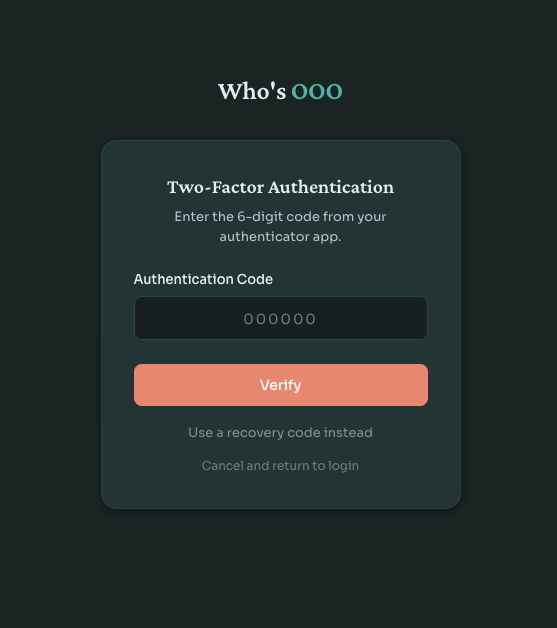
Who's OOO now ships with optional two-factor authentication. Users turn it on from their account settings, scan a QR code with any TOTP app, save a set of backup codes, and require a second factor at every login from then on. Nothing surprising from the user perspective. The interesting parts are behind the form.
2fa bundle
The Symfony ecosystem already has scheb/2fa-bundle, which handles the authentication flow, integrates with the symfony firewall, and supports TOTP, email codes, backup codes, and trusted devices. No need for custom solution here.
The interesting work was integrating it without leaving the secrets in plaintext.
TOTP secrets at rest
The default scheb integration stores the TOTP secret as a plain string on the user entity. That works, but anyone with read access to the database has everything they need to clone every user's authenticator. A leaked backup, a forgotten dump on a developer's laptop, an SQL injection somewhere down the line.
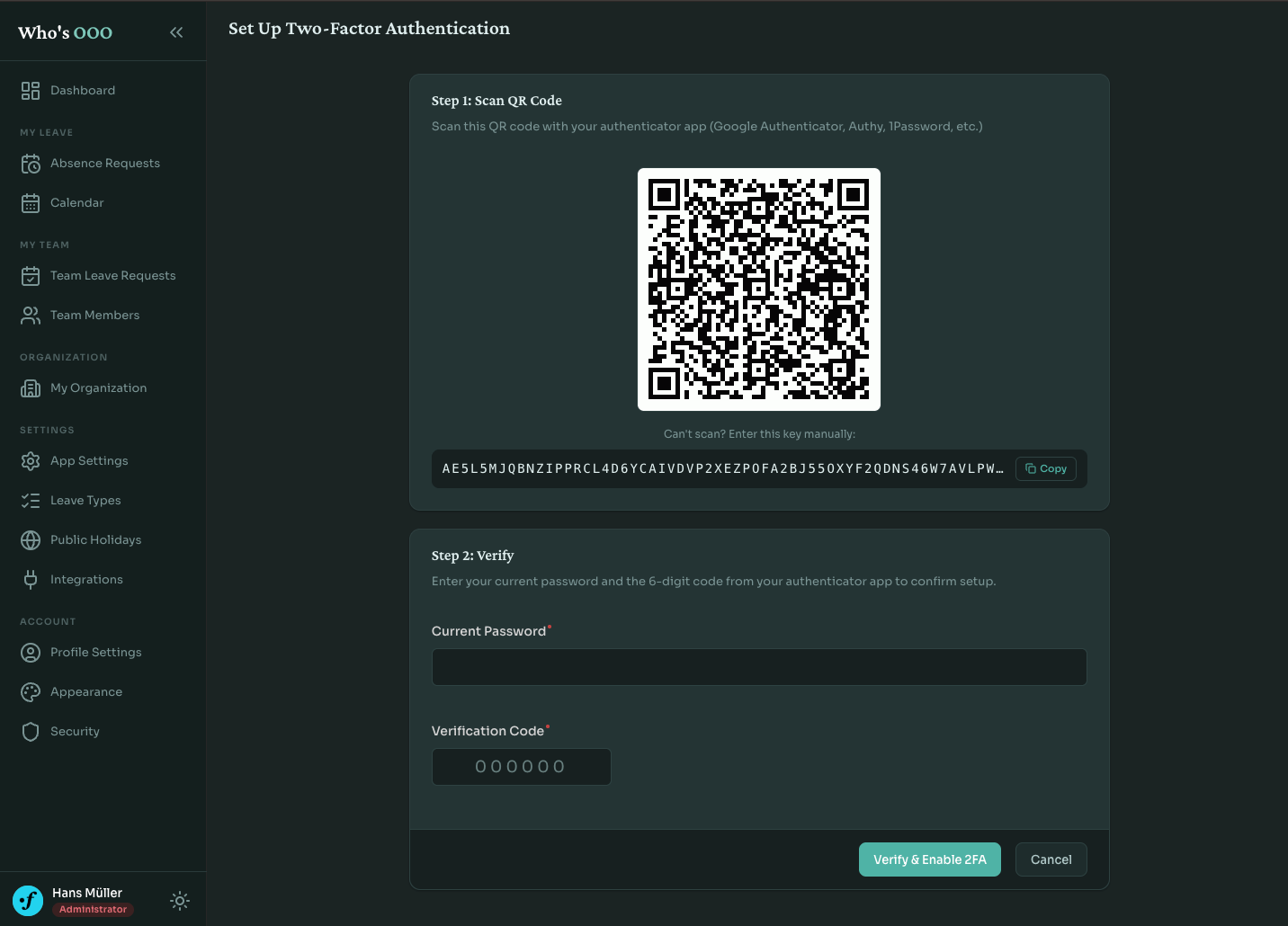
I wanted to keep secrets encrypted in the database and only decrypt them at the moment of verification. sodium_crypto_secretbox is the straightforward libsodium option: authenticated symmetric encryption with a 32-byte key.
class TotpSecretEncryptor
{
    private readonly string $key;

    public function __construct(
        #[Autowire(env: 'TOTP_ENCRYPTION_KEY')]
        string $base64Key,
    ) {
        $decoded = base64_decode($base64Key, true);

        if (false === $decoded || SODIUM_CRYPTO_SECRETBOX_KEYBYTES !== strlen($decoded)) {
            throw new \InvalidArgumentException('Invalid TOTP encryption key: must be a base64-encoded 32-byte key');
        }

        $this->key = $decoded;
    }

    public function encrypt(string $plainSecret): string
    {
        $nonce = random_bytes(SODIUM_CRYPTO_SECRETBOX_NONCEBYTES);
        $ciphertext = sodium_crypto_secretbox($plainSecret, $nonce, $this->key);

        return base64_encode($nonce.$ciphertext);
    }

    public function decrypt(string $encryptedSecret): string
    {
        // ...
    }
}
2FA is off by default, and the encryptor is registered as a lazy service. A fresh self-hosted instance runs fine without TOTP_ENCRYPTION_KEY configured; the service only gets instantiated once someone actually turns the feature on. At that point the constructor refuses to start if the key is missing or not exactly 32 bytes once decoded. I'd rather the container fail loudly the moment 2FA is used than fall back to a weak default.
The key itself is generated once with openssl rand -base64 32 and stored wherever the rest of your secrets live.
Decorating the authenticator
The interesting part is wiring the encryption into scheb without forking it. The bundle exposes a TotpAuthenticatorInterface and reads the secret directly from the user entity. If you put encrypted bytes there, the bundle has no idea what to do with them.
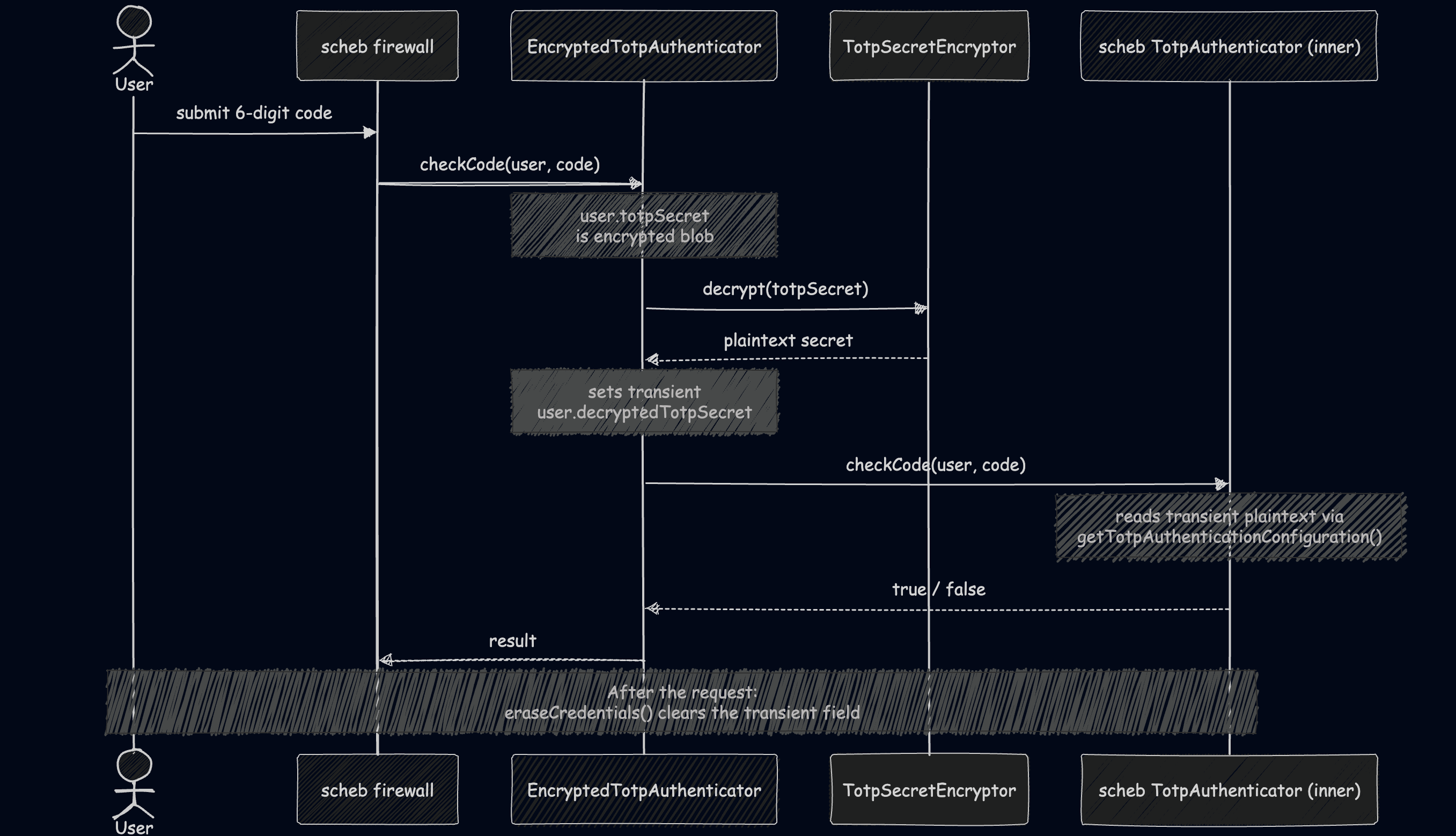
A decorator fixes it. EncryptedTotpAuthenticator wraps the bundle's authenticator and decrypts the secret onto a transient field on the user just before the inner authenticator reads it:
class EncryptedTotpAuthenticator implements TotpAuthenticatorInterface
{
    public function __construct(
        private readonly TotpAuthenticatorInterface $inner,
        private readonly TotpSecretEncryptor $encryptor,
    ) {
    }

    public function checkCode(object $user, string $code): bool
    {
        $this->decryptSecretIfNeeded($user);

        return $this->inner->checkCode($user, $code);
    }

    private function decryptSecretIfNeeded(object $user): void
    {
        if (!$user instanceof User || !$user->isTwoFactorEnabled || null === $user->totpSecret) {
            return;
        }

        $user->setDecryptedTotpSecret($this->encryptor->decrypt($user->totpSecret));
    }
}
The user entity has a separate non-persisted property for the decrypted secret, and eraseCredentials() clears it once the request is done. The bundle never knows or cares that the secret was encrypted at rest. From its perspective, it's reading a normal in-memory string. Decoration doing what it's good at.
Backup codes
Backup codes is the recovery option when someone's phone is in a drawer at home or wiped between devices. They need to be unguessable and stored so a database leak doesn't immediately compromise them.
Eight codes per user, generated from a 31-character alphabet that drops the visually ambiguous ones (0, 1, i, l, o):
private const ALPHABET = 'abcdefghjkmnpqrstuvwxyz23456789';
Each code is two four-character halves separated by a dash, generated with random_int.
Storage uses Argon2id via PHP's native password hasher, the same type as the password column. password_verify is constant-time and handles the comparison:
class BackupCodeHasher
{
    private readonly NativePasswordHasher $hasher;

    public function __construct()
    {
        $this->hasher = new NativePasswordHasher(opsLimit: 4, memLimit: 9_437_184, algorithm: PASSWORD_ARGON2ID);
    }

    public function hash(string $code): string
    {
        return $this->hasher->hash($code);
    }

    public function verify(string $hashedCode, string $plainCode): bool
    {
        return $this->hasher->verify($hashedCode, $plainCode);
    }
}
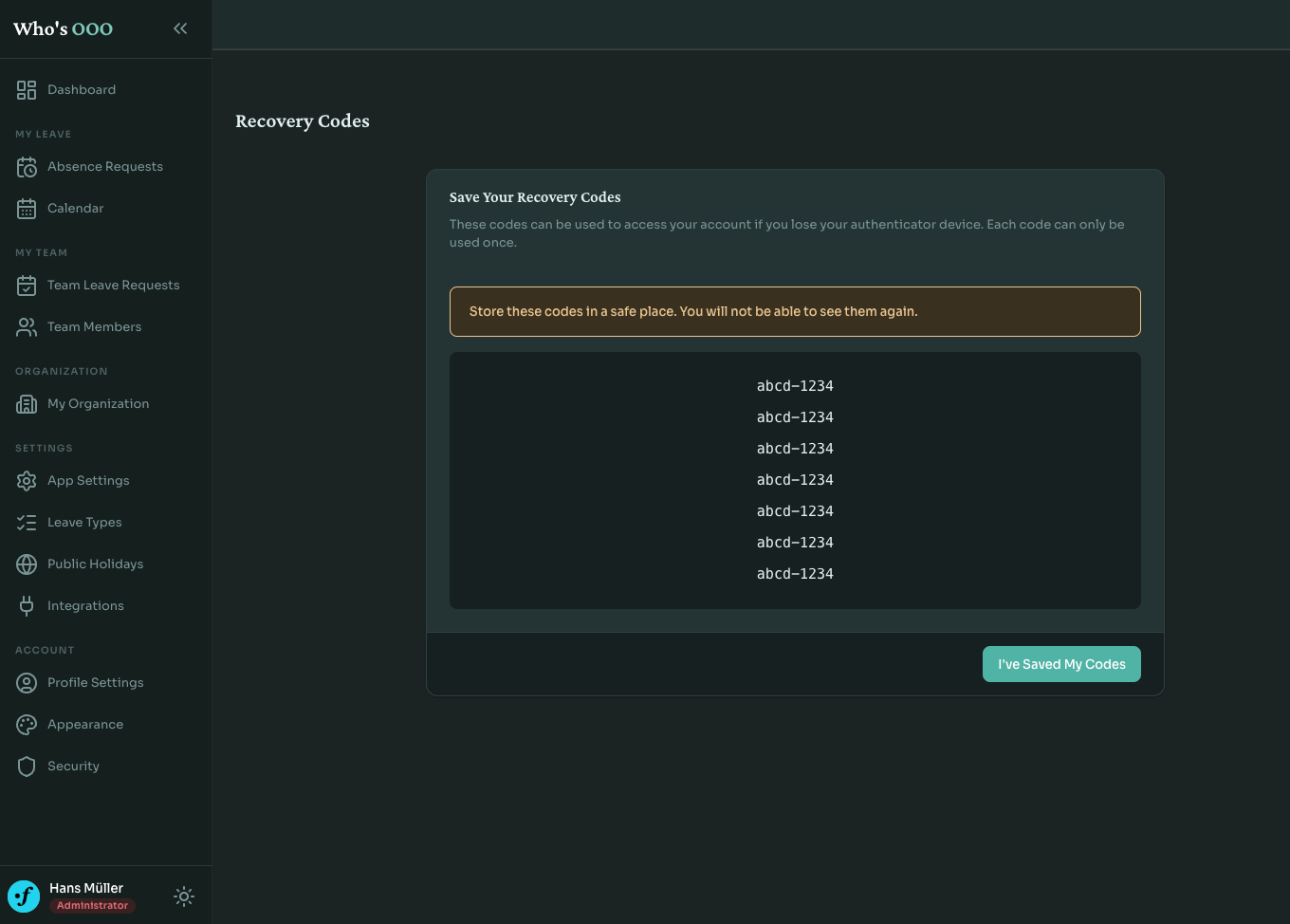
Codes are shown to the user exactly once, on the screen right after enabling 2FA. After that, only the hashes stay.
Re-authentication for privileged actions
There's a category of situations where someone wanders away from their laptop, and a coworker walks past, and ten seconds later 2FA has been disabled "as a joke." Or worse, an attacker with a compromised session can quietly turn off the second factor before doing anything noisy.
Enabling, disabling, and regenerating backup codes all require the user to type their password again. Disable additionally requires a current TOTP code. Both checks happen inside the controller before anything is written:
if (!$this->passwordHasher->isPasswordValid($user, $dto->password)) {
    $this->addFlash('danger', 'settings.two_factor.disable.error.invalid_password');
    return $this->redirectToRoute('app_two_factor_disable');
}

// ... TOTP check follows
Small friction. Worth it.
Rate limiting
Symfony's rate limiter does the job here:
framework:
  rate_limiter:
    two_factor_login:
      policy: fixed_window
      limit: 5
      interval: "15 minutes"
A subscriber listens for TwoFactorAuthenticationEvents::ATTEMPT, consumes a token keyed by user identifier, and throws TooManyLoginAttemptsAuthenticationException when the bucket is empty. The same limiter is applied to the setup and disable controllers, so brute-forcing the password-plus-code prompt is bounded too. On a successful authentication the bucket resets.
Five attempts per fifteen minutes is intentionally tight. A real user typing a code from their phone won't hit it. Anything automated will.
Avoiding the open redirect
One detail that's easy to get wrong is where the user lands after the second factor is verified. The Scheb package supports a default_target_path option, but it also honors whatever target was on the original request.
The firewall config pins it:
two_factor:
  auth_form_path: 2fa_login
  check_path: 2fa_login_check
  default_target_path: /app/dashboard
  always_use_default_target_path: true
always_use_default_target_path: true tells the bundle to ignore the original target and always land on the dashboard. Less confusing for users.
What this doesn't do
A few things I didn't ship.
WebAuthn and hardware keys. They're a better second factor than TOTP, but TOTP covers most users with very little setup friction. Hardware keys are a separate piece of work.
Forced 2FA across an org. An admin can't currently require everyone to enable it. Reasonable for the next iteration, but I wanted the opt-in flow stable first.
Trusted devices. The 2fa package supports them, but Who's OOO is the kind of app you log into rarely, and skipping the second factor "for thirty days" felt like the wrong default for a security feature, at least today.
In closing
2FA isn't the headline feature anyone picks a leave planner for. Nobody's switching from a spreadsheet because Who's OOO supports TOTP. But teams self-hosting it care that the data stays secure, and for them proper account verification is part of the desired flow.
Who's OOO is open source and free to self-host. The 2FA implementation is on GitHub along with the rest of the code. If the project is useful to you, give it a star, or consider sponsoring the development if you want to support it.